
IPTV Sports in Canada: How to Watch Live Games Smoothly
Published · Updated · 7 min read · IPTVIVA
Watching IPTV sports in Canada comes down to two things: a channel that actually plays, and a connection that holds up through overtime. With the IPTViva app you open the Home screen, pick today's match and press Watch now: the app takes you to a channel that has just been tested and is playing well. Your part is the setup around it, a stable connection, the right device and a few minutes of preparation, and that's what this guide covers, for game nights, weekend matchups and late games.
In this guide
- How the app finds a channel that works
- Which IPTV sports channels are included?
- Choosing the right channel and commentary
- Game-day checklist
- Picture settings for fast-moving sports
- Watching on more than one screen
- The best devices for live sports
- Watching away from home
- Live, but a little behind
- Why free sports streams let you down
- If it buffers during a match
- FAQ
How the app finds a channel that works
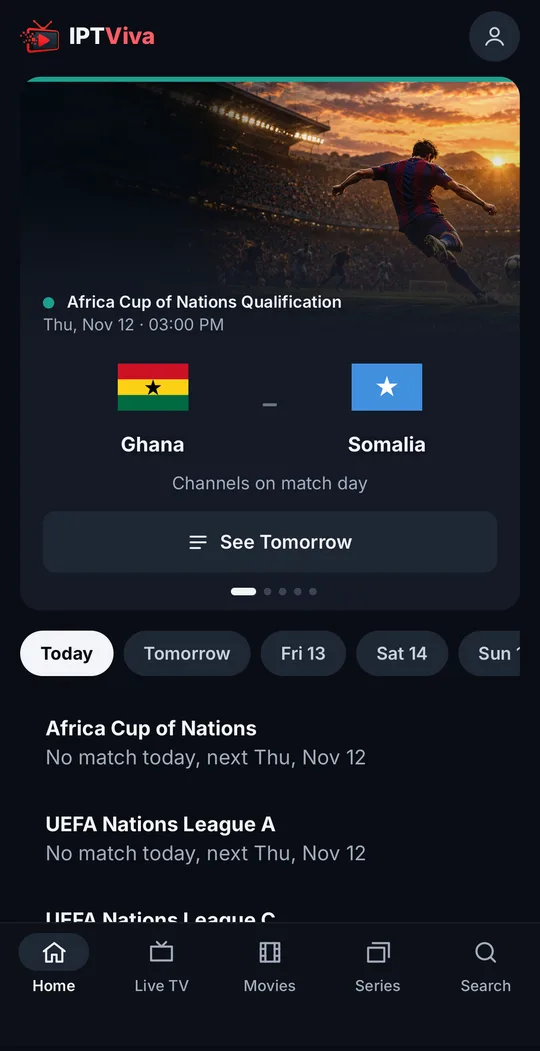
The IPTViva app opens on today's matches, picked for where you watch from, followed by everything on now and later today. Each match has a Watch now button that takes you straight to a channel showing it, and that channel isn't picked at random:
- Shortly before kick-off and during the match, the service tests the channels carrying it: how fast they start, whether the picture keeps up with live, and whether they pause or drop.
- Only channels that passed a recent test are listed. Channels that viewers report as buffering or frozen drop out of the list.
- Each match shows how many channels carry it, per language, so if one struggles you can switch to another in a couple of clicks.
- If every channel for a match fails, the match isn't listed at all, so you don't land on a dead link at kick-off.
That's the part most IPTV setups leave to you: scrolling through a long channel list five minutes before the game, hoping one works.
Which IPTV sports channels are included?
The sports channels and competitions in the lineup for Canada are listed on our live sports page, so check there for the full list rather than relying on a summary. Availability can vary by event and broadcast rights. If one channel or competition matters most to you, ask us on WhatsApp before you subscribe and we'll confirm it.
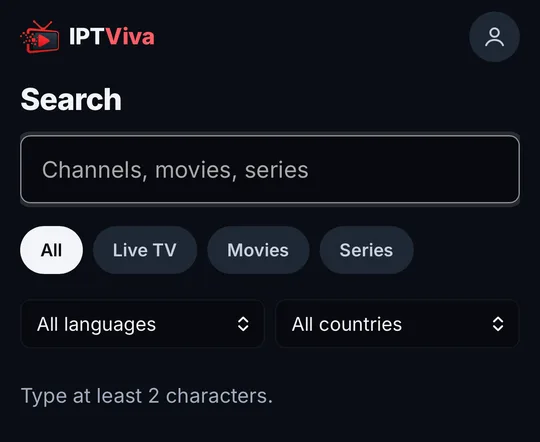
Beyond the Home screen, you can find any sports channel from Live TV or with Search: type a team, a competition or a channel name, and the results come from the whole catalogue at once.
Choosing the right channel and commentary
- Set your channel languages. The first time you sign in, the app asks which languages you watch. The list is filtered to those, so you see commentary you understand and the list loads quickly. You can change it any time in your account.
- Pick by language on the match card. The match shows how many channels carry it in each language; choose the one you want.
- Save your regular channels as favorites, so they're one click away on match days.
Game-day checklist
The day before or that morning
- Wire it if you can. An Ethernet cable to the TV or box beats Wi-Fi every time. Otherwise use 5 GHz Wi-Fi close to the router. On busy evenings, when the whole household is online, a cable makes the biggest difference.
- Check your speed at the time you'll be watching: about 10–15 Mbps per screen for HD and 25 Mbps or more for 4K. See how much internet speed IPTV needs.
An hour before
- Restart the TV or box, and let it install any updates now, not at kick-off.
- Pause big downloads on the same network: game consoles, cloud backups, large updates.
Ten minutes before
- Open the app and go to the match, so the channel is ready before the start.
- Count your screens: if someone else is also watching, make sure your plan allows two (see below).
Picture settings for fast-moving sports
- Turn on your TV's sports or standard picture mode, and try switching off heavy motion smoothing if the image looks artificial (the "soap opera" effect).
- If your box has a "match frame rate" option, turn it on so the picture follows the broadcast's frame rate.
- If the connection is weak, choose a lower quality in the player settings: a steady HD picture beats a 4K one that keeps pausing.
- Use the TV's own speakers or soundbar settings for sport: many TVs have a "clear voice" mode that lifts commentary above crowd noise.
Watching on more than one screen
Your account works on every device, but the number of screens that can watch at the same time depends on the plan: Standard allows one, Premium two. If you want the match on the TV while someone follows it on a phone, you need Premium; see pricing.
The best devices for live sports
- On the TV: a Fire TV Stick 4K or 4K Max, or an Android TV / Google TV box with an Ethernet port. Setup takes five minutes: see the Fire TV Stick guide or the Android TV and Google TV guide.
- Samsung and LG TVs work too, but installing the app takes a few extra steps; a stick is often simpler.
- On the go: iPhone, iPad or an Android phone, in the browser with the same account.
- On a laptop: open app.iptviva.com, nothing to install.
Watching away from home
- Same account, any device: sign in from your phone, tablet or laptop when you're travelling.
- Mobile data: an HD stream can use roughly 1.5–3 GB per hour, so a full match with build-up adds up quickly on a capped plan. Prefer Wi-Fi when you can, or pick a lower quality.
- Hotel and public Wi-Fi is often shared and slow at peak times; if the picture struggles, a phone hotspot can be steadier.
Live, but a little behind
Like every streaming service, IPTV runs a little behind the TV broadcast, often by several seconds and sometimes more. If you follow scores on your phone or hear the neighbours cheer first, that's why. Turn off score notifications during the match to keep the surprise.
Why free sports streams let you down
Free streaming sites and "free IPTV" apps are tempting, but they're the most common reason people miss the decisive moment: they're overloaded at kick-off, covered in pop-up ads, often stop mid-match and can push malware onto your device. If you want to try before paying, a free trial in a proper app is a far better test.
If it buffers during a match
- Switch channel from the match card: another listed channel for the same game often plays better.
- Lower the quality in the player if your connection is the bottleneck.
- Check the network: is anyone else downloading or streaming in 4K? Is the device far from the router?
- Restart the app, then the device if needed.
- Still stuck? Go through our guide to fixing IPTV buffering, or message us on WhatsApp from the contact page.
FAQ
Can I watch a match on two screens at once?
Yes, with the Premium plan, which allows two screens at the same time. Standard allows one.
Is IPTV sports really live?
Yes, it's the live broadcast delivered over the internet, usually a few seconds behind the TV signal.
How fast does my internet need to be for sports?
About 10–15 Mbps per screen for HD and 25 Mbps or more for 4K, and above all stable. A wired connection matters more than raw speed.
Which sports channels are included in Canada?
The lineup for Canada is on our live sports page. Availability can vary by event and broadcast rights; ask us on WhatsApp about a specific channel or competition.
Can I watch replays of matches I missed?
Not yet: the app has no catch-up or recording for now. The TV guide shows what's on now and next, about 24 hours ahead.
Can I test it before a big game?
Yes. The free trial starts in the app as soon as you create your account. Try it during a live match at the time you usually watch.
Ready to watch without limits?
Start with a free trial, straight away. No commitment. Cancel any time before you choose a plan.
Free trial →