
Our app
The IPTViva app: one IPTV app for every screen
IPTViva is a complete streaming app, not an empty player waiting for a playlist. Create an account with your email and a password you choose, and your channels, today's matches, films and series are there on the TV, the phone and the computer.
What's in the app
Today's matches on the home screen
Kick-off times in your own time zone, live scores and the channels that show each game, tested before kick-off.
Live TV, sorted for you
Channels grouped by category, with filters by language and country, so you find yours without scrolling through thousands.
Films and series
Posters, year, genre and a ★ rating, plus favourites and "continue watching" to pick up where you stopped.
A real TV guide
What's on now and next under each channel, with a progress bar, and a Guide button with roughly the next 24 hours in your time zone.
One account, every screen
Sign in with the same email and password everywhere. Standard plays on 1 screen at a time, Premium on 2.
Your plan and support in one place
See your plan, screens and renewal date, reach support on WhatsApp, Telegram or email, and use the app in six languages.
Screenshots from the app
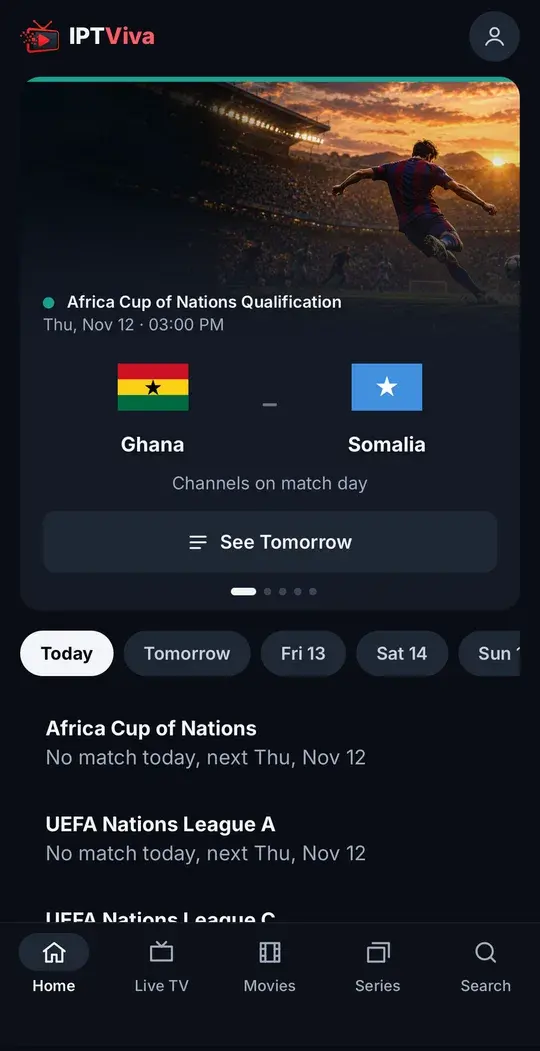
The home screen: today's matches with their kick-off time and the channels that show them 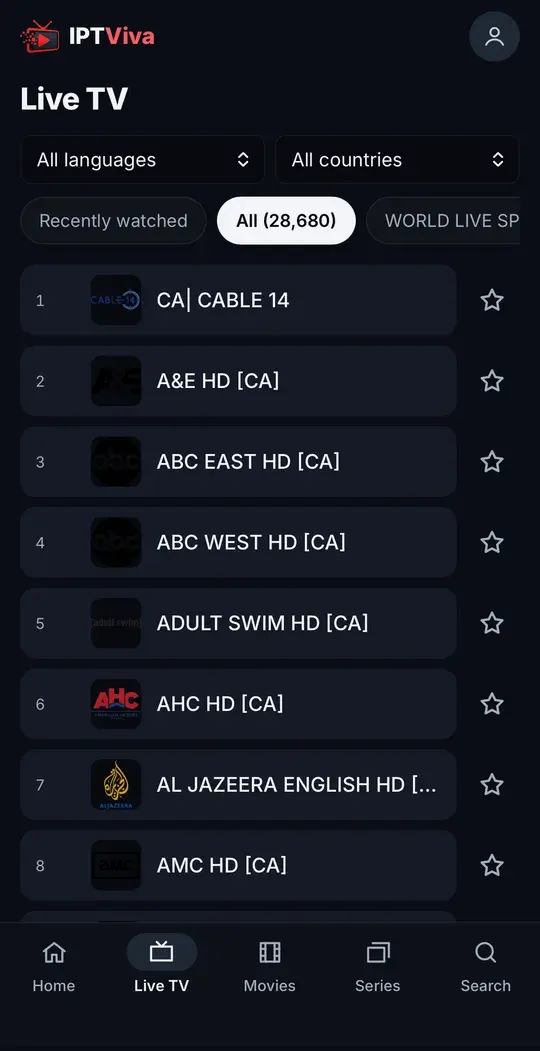
Live TV: every channel, with filters by language and country 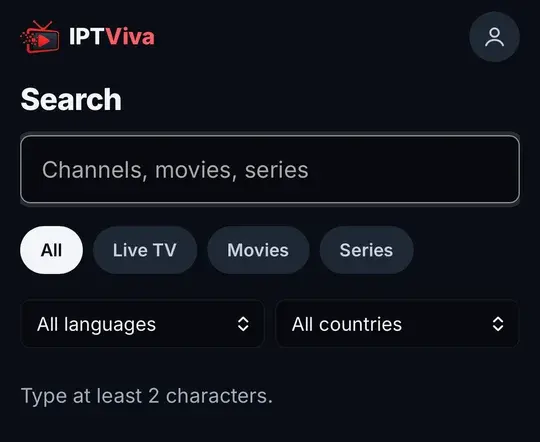
Search across channels, films and series in one place
Where the app runs
The same account works on all of these. Each device has a step-by-step guide.
Fire TV Stick
Easily the most common streaming stick in Canadian homes: Fire TV Stick, Fire TV Cube and Fire TV-powered TVs.
Install the TV app with Downloader and the code 7979931.
Setup guide →Smart TV (LG & Samsung)
LG (webOS) and Samsung (Tizen) Smart TVs: our TV apps, or the TV's own browser.
Open app.iptviva.com in the TV's browser, or install our LG or Samsung app from a computer.
Setup guide →Android TV, box & phone
Android TV boxes, Google TV, and any Android phone or tablet.
On a TV or box, install app.iptviva.com/tv.apk; on a phone or tablet, open app.iptviva.com in Chrome.
Setup guide →iPhone & iPad (iOS)
iPhone and iPad, on Wi-Fi or mobile data.
Open app.iptviva.com in Safari and add it to your Home Screen.
Setup guide →Windows & Mac
Windows PCs and Macs, useful for watching at your desk or casting to the living room TV.
Open app.iptviva.com in Chrome, Edge, Safari or Firefox.
Setup guide →
Apple TV: there's no IPTViva app for Apple TV yet. A Fire TV Stick in a spare HDMI port is the simplest option.
Start in three steps
Create your account
In the app, with your name, email, WhatsApp number and your own password.
Confirm your email
Enter the 6-digit code we send you. The free trial is then available straight away.
Press play
The trial starts the first time you play something. If you subscribe, your plan is added to the same account.
What the app doesn't do yet
- Catch-up or replay isn't available yet. You can pause live TV, and films and series are always on demand.
- The LG and Samsung apps aren't in the TV stores yet: they install from a computer, or you can use the TV's browser.
- There's no Apple TV app, and the app isn't on Google Play or the App Store: the TV app installs from our server, and on iPhone it runs in Safari.
No MAC address, no playlist
You never send us a MAC address or a device key, and there's no playlist link that can leak. The app records what it needs to run the service (your name, email and WhatsApp number, the device type, the connection's country and city, a device identifier and what you watch). It's never sold or shared, there are no ads, and you can delete everything from Account.
Read how it works →FAQ
Questions about the IPTViva app
Is the IPTViva app free?
The app is included in every plan, with no activation fee or player licence. You can try it free before choosing a plan.
Do I need TiviMate, IPTV Smarters or an M3U link?
No. We no longer send M3U links or Xtream Codes. Everything plays in the IPTViva app with your account.
Why isn't it on Google Play or the App Store?
The TV app installs from our own server, with the Downloader code 7979931 on Fire TV. On iPhone and iPad it runs in Safari and you add it to the Home Screen, so there's nothing to download.
How many screens can I use?
Standard allows 1 screen at a time and Premium 2. You can sign in on more devices, but only that number can play at once.
Which languages is the app in?
Six: English, French, Spanish, German, Norwegian and Swedish.
Ready to watch without limits?
Start with a free trial, straight away. No commitment. Cancel any time before you choose a plan.